更新内核
编译安装方式
1.下载内核软件包
https://mirrors.tuna.tsinghua.edu.cn/kernel/v4.x/
2.解包
[root@k8s-master1 software]# tar xf linux-4.19.100.tar.xz
3.安装依赖
[root@k8s-master1 ~]# yum install ncurses-devel bison flex elfutils-libelf-devel groupinstall "Development Tools" -y
4.配置
[root@k8s-master1 ~]# cd linux-4.19.100
[root@k8s-master1 linux-4.19.100]# make menuconfig
5.编译
[root@k8s-master1 linux-linux-4.19.100]# make -j 4
6.安装模块
[root@k8s-master1 linux-4.19.100]# make modules_install
[root@k8s-master1 linux-4.19.100]# make install
7.更改默认启动核心
将GRUB_DEFAULT=saved 改成 GRUB_DEFAULT=0
[root@k8s-master1 ~]# vim /etc/default/grub
GRUB_TIMEOUT=5
GRUB_DISTRIBUTOR="$(sed 's, release .*$,,g' /etc/system-release)"
GRUB_DEFAULT=0
GRUB_DISABLE_SUBMENU=true
GRUB_TERMINAL_OUTPUT="console"
GRUB_CMDLINE_LINUX="rd.lvm.lv=rhel/root rd.lvm.lv=rhel/swap rhgb quiet"
GRUB_DISABLE_RECOVERY="true"
8.使配置文件生效
[root@k8s-master1 ~]# grub2-mkconfig -o /boot/grub2/grub.cfg
9.修改默认启动的内核
[root@k8s-master1 ~]# grub2-editenv list  //查看默认启动内核

saved_entry=CentOS Linux (3.10.0-1160.45.1.el7.x86_64) 7 (Core)

[root@k8s-master1 ~]# cat /boot/grub2/grub.cfg | grep menuentry 查看所有内核

'CentOS Linux (4.19.100) 7 (Core)'

'CentOS Linux (3.10.0-1160.59.1.el7.x86_64) 7 (Core)'

[root@k8s-master1 ~]# grub2-set-default 'CentOS Linux (4.19.100) 7 (Core)' //设置默认启动内核
yum安装方式
导入ELRepo仓库的公共密钥
rpm --import https://www.elrepo.org/RPM-GPG-KEY-elrepo.org
安装ELRepo仓库的yum源
rpm -Uvh http://www.elrepo.org/elrepo-release-7.0-3.el7.elrepo.noarch.rpm
查询可用内核版本
yum --disablerepo="*" --enablerepo="elrepo-kernel" list available
安装最新的稳定版本内核
yum -y --enablerepo=elrepo-kernel install kernel-lt
设置 grub2
内核安装好后,需要设置为默认启动选项并重启后才会生效
查看系统上的所有可用内核:
awk -F\' '$1=="menuentry " {print i++ " : " $2}' /etc/grub2.cfg
方法1:通过 grub2-set-default 0 命令设置
grub2-set-default 0
方法2:编辑 /etc/default/grub 文件
vim /etc/default/grub
编辑(e)将GRUB_DEFAULT设置为0,如下
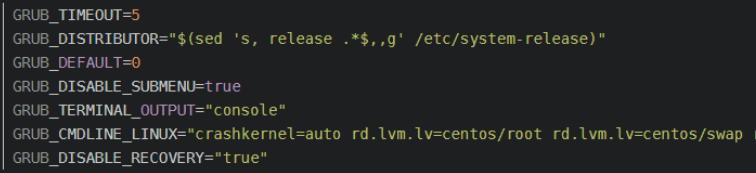
修改完成后保存退出(:wq)
生成 grub 配置文件并重启
grub2-mkconfig -o /boot/grub2/grub.cfg
重启虚拟机或物理机
删除旧内核(可选)
查看系统中的全部内核
rpm -qa | grep kernel
可选择删除3.10版本的内核
yum remove kernel-*